Warehouse Management System for Chennai & India
A system that controls the full lifecycle of stock inside a warehouse — what comes in, where it sits, how it moves, how it goes out, and what comes back. Every movement is a document, and every document writes to one auditable stock ledger.
5
Core Modules
8
Process Stages
3
Stock-Accuracy Documents
Both
Return Directions
Stock Ledger — Live
18,420
Available Stock
540
In Transit
26
Pending Putaway
9
Open Returns
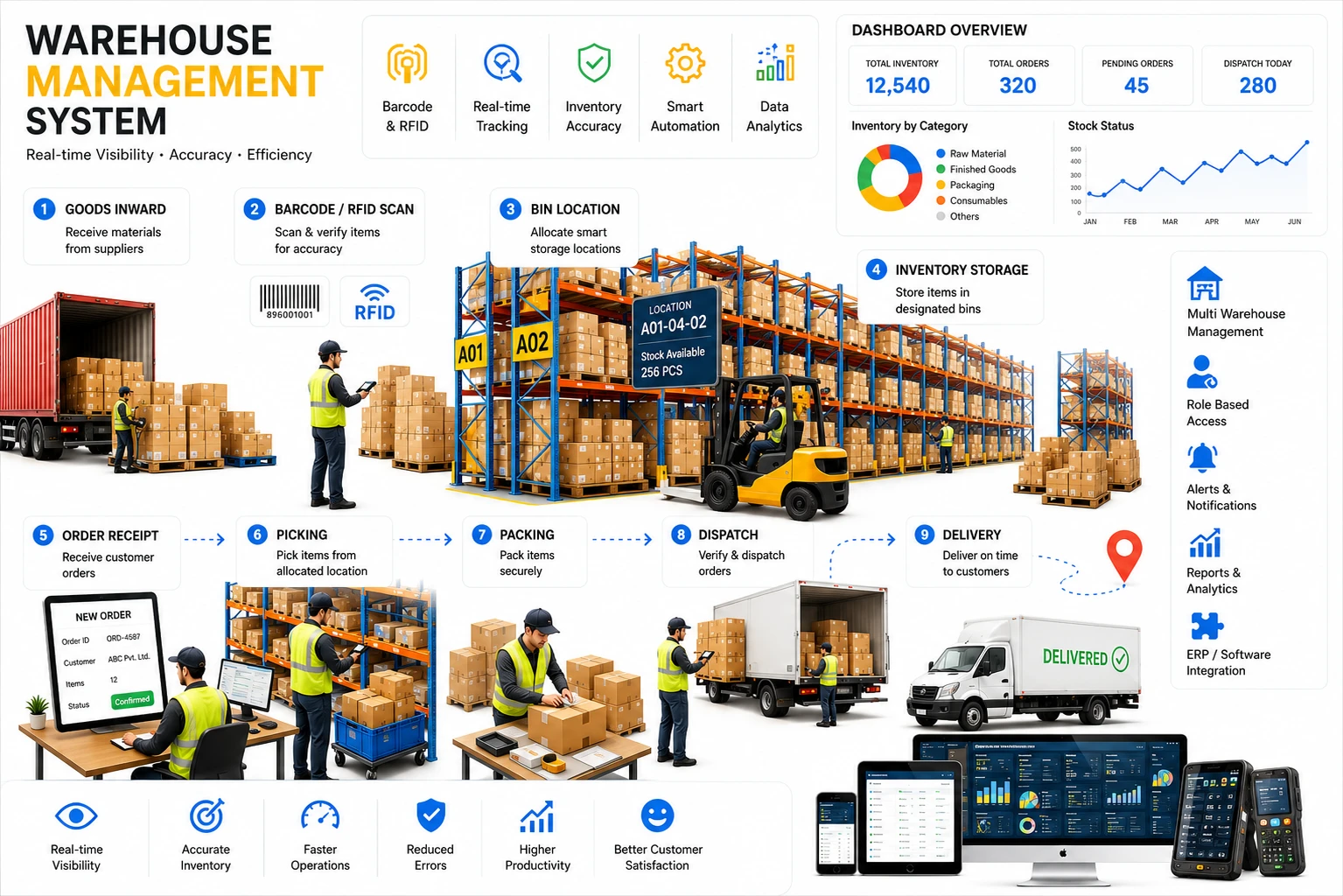
Stock Control From Goods-In to Goods-Back
Most warehouse software tracks what you have. This one controls how it got there and where it went — receipt, quality check and putaway on the way in; adjustments, transfers and cycle counts while it sits; barcode-verified picking on the way out; and a formal return document for anything that comes back.
Nothing changes quantity invisibly. Every movement is a document, and every document posts to the same stock ledger, so the number on screen is always backed by a transaction somebody can point at.
Warehouse Management Features
Five connected areas: what happens inside the warehouse, how stock stays accurate, how it moves between sites, how it ships to customers, and how it comes back.
Inside the Warehouse
- Each warehouse is organised into zones and locations, so stock is tracked to the specific shelf or bin holding it — not just "in the warehouse somewhere"
- Goods arriving are checked in through a Goods Receipt Note, optionally inspected through a Quality Control step, then placed through a guided Putaway step that assigns each unit to a specific storage location — nothing counts as available stock until it has been received, checked and put away
- Every physical unit can carry its own barcode label, generated when it is received or produced, giving unit-level traceability from goods-in through to goods-out
- Batch and expiry (shelf-life) tracking is built in, and feeds First-Expiry-First-Out (FEFO) picking wherever shelf life matters
- A complete stock ledger records every movement — in, out, transfer, adjustment and return — so quantity on hand is always backed by an auditable transaction history rather than a number somebody edited
- Multi-client (3PL) support lets one physical warehouse hold several clients' inventory side by side, with every transaction scoped to the correct client automatically
- Role-based access down to the warehouse: a company administrator sees every branch and warehouse, a branch user sees one branch and all warehouses under it, and a warehouse user sees only their own
How It Works
From the loading bay to the ledger — eight steps, every one of them a document.
STEP 1
Receive & Put Away
Goods arrive and are checked in via a Goods Receipt Note, optionally quality checked, then put away into a specific zone and location — only then do they count as available stock.
STEP 2
Stock Under Tracking
Stock sits under full location, batch and expiry tracking, with every movement recorded in the stock ledger.
STEP 3
Keep It Accurate
Stock Adjustments for damage, loss or found stock; Stock Transfers for relocation; Stock Audits that post their own variance on completion.
STEP 4
Raise Dispatch Order
Targeting either a customer or another of the company's own warehouses.
STEP 5
Generate Pick List
Generated automatically using the company's chosen picking strategy, resolving down to specific labelled units.
STEP 6
Scan, Issue & Gate Exit
An operator scans and issues each unit at Material Issue, optionally packing and loading it before Gate Exit.
STEP 7
Warehouse Transfer Receipt
For a dispatch-grade internal transfer, the receiving warehouse scans each unit in on arrival, completing the chain of custody.
STEP 8
Handle Returns
A Return Note captures items, batches and reasons for customer or supplier returns; posting moves the stock with batch and expiry intact.
Why Stock Accuracy Quietly Drifts — and How to Stop It
Stock records rarely break in one dramatic moment. They erode: a damaged carton nobody wrote off, a pallet moved to a different bay "just for now", and an annual stock take that arrives eleven months too late. Three controlled documents close those three gaps — and each one writes to the same stock ledger, so nothing changes quantity invisibly.
Stock Adjustment
The gapDamage, loss and found stock change what's on the shelf without any transaction behind it.
The controlA reasoned, approval-gated document — Damage, Loss, Found, Correction or Other — that preserves both the recorded and adjusted quantity and only moves stock on posting.
Stock Transfer
The gapInformal shelf-to-shelf moves leave the system pointing at a bin the goods left days ago.
The controlOne document for shelf-to-shelf and site-to-site relocation, with Draft → In Transit → Completed so nothing is silently missing between the two ends.
Stock Audit (Cycle Count)
The gapA once-a-year stock take means eleven months of drift before anyone checks the record.
The controlCounts run in routine slices by material, location or batch, snapshotting system quantity per line and posting the variance automatically on completion.
The Returns Loop, in Both Directions
Goods moving backwards are where most warehouse systems go quiet — and where stock accuracy usually dies. Here, a return is a formal document rather than an informal put-it-back-on-the-shelf, in both directions.
Customer Return (Inbound)
Goods coming back from a specific customer into a specific warehouse, under their own auto-generated document number.
- Captures material, quantity, batch and a reason for the return
- Batch and expiry carry through, so stock rejoins FEFO rotation
- Draft → Posted: stock moves only on the deliberate posting action
- Scoped to the correct client automatically on a 3PL site
Supplier Return (Outbound)
Rejected or defective material going back out to a supplier, reducing stock with the same discipline as an inbound return.
- Same document type, same Draft → Posted control
- Reason captured per line, so returns are analysed by cause
- Stock reduces only when the document is posted
- Batch detail preserved rather than lost on the way out
Warehouse Management for Chennai and Pan-India Operations
Chennai sits at the meeting point of manufacturing and distribution — the Ambattur, Sriperumbudur and Oragadam industrial belts on one side, and port-adjacent logistics moving goods in and out on the other. Warehouses here rarely do just one job: the same building often holds raw material for a plant, finished goods awaiting despatch, and stock held on behalf of a client.
That mix is exactly where location-level tracking, per-client scoping and controlled adjustment documents matter. And for businesses running warehouses in more than one state, the same barcode-level picking and Warehouse Transfer Receipt process that confirms a movement between two Chennai sites applies unchanged across a multi-state network — stock stays traceable to its receipt, batch and putaway location wherever in India it lands.
Built for Warehouse-Heavy Operations
Manufacturing Plants
Distribution & Logistics
3PL & Multi-Client Warehousing
Retail & FMCG Distribution
Multi-Branch Warehouse Networks
Spare Parts & Component Stores
Frequently Asked Questions
Q.01
How do you handle customer returns in a WMS?
A customer return is recorded as a formal Return Note against a specific customer and warehouse, capturing the material, quantity, batch and a reason for the return. Nothing touches stock while the document is in Draft — posting is the single action that writes the movement to the stock ledger, with batch and expiry carried through so the goods rejoin FEFO rotation correctly.
Q.02
What is the difference between a stock adjustment and a stock transfer?
An adjustment changes the quantity on hand when stock changed without a transaction — damage, loss, found stock or a correction — and runs through an approval chain before posting. A transfer doesn't change total quantity at all; it relocates stock from one location or warehouse to another, moving through Draft → In Transit → Completed.
Q.03
How does cycle counting keep stock accurate?
A cycle count snapshots the system quantity the moment each line is added, then records the physically counted quantity beside it, so the variance is evidenced rather than asserted. On completion the variance posts to the stock ledger automatically — and because counts run against selected materials, locations or batches, you verify in routine slices instead of shutting the warehouse for an annual stock take.
Q.04
How do you move stock between two warehouses?
Two ways. A direct stock transfer is an internal relocation document with in-transit visibility. A dispatch-grade transfer raises a Dispatch Order against your own warehouse and uses the same pick list, picking strategy and barcode-level resolution as a customer shipment, with the receiving site scanning each unit in via Warehouse Transfer Receipt.
Q.05
Can one warehouse store stock for multiple clients?
Yes. Multi-client (3PL) support lets one physical warehouse hold several clients' inventory side by side, with every transaction — receipt, transfer, dispatch, adjustment and return — scoped to the correct client automatically. A transfer moves stock between locations but never between clients.
Q.06
Do you provide warehouse management software in Chennai and across India?
Yes. Teknovara Solutions is based in Chennai and deploys warehouse management systems for manufacturers, distributors and 3PL operators across Tamil Nadu and India, including multi-state warehouse networks running under one platform.
See Your Own Stock Move Through the System
From goods receipt to a posted return — see how it handles your actual materials, batches, warehouses and picking rules.
Built and supported from Chennai, serving warehouses across India